Why Every SaaS Product Needs a Public Roadmap (And How to Build One)
A public roadmap is one of the highest-leverage things a SaaS company can publish. It costs almost nothing to maintain, yet it builds user trust, reduces support volume, aligns sales expectations, and gives your most engaged users a reason to stay — even before a feature they want has shipped.
And yet most SaaS products either have no roadmap at all, or a roadmap buried in a slide deck last updated six months ago. This guide covers why a public roadmap matters, what to put on it, what to leave off, and how to build one users actually find useful — with AnnounceFly.
Why a Public Roadmap Reduces Churn
The most common reason users churn from SaaS products is not price — it is uncertainty. "Does this product have a future? Is that feature I need ever going to ship? Are they even working on this?"
A public roadmap answers all three questions before users have to ask. When a user can see that the integration they need is "In Progress," they don't churn — they wait. And while they wait, they keep paying.
Segment, Notion, Linear, and Intercom all run public-facing roadmaps. It is not a coincidence that these are also products with some of the highest NPS scores in their categories.
The Three-Column Model That Works
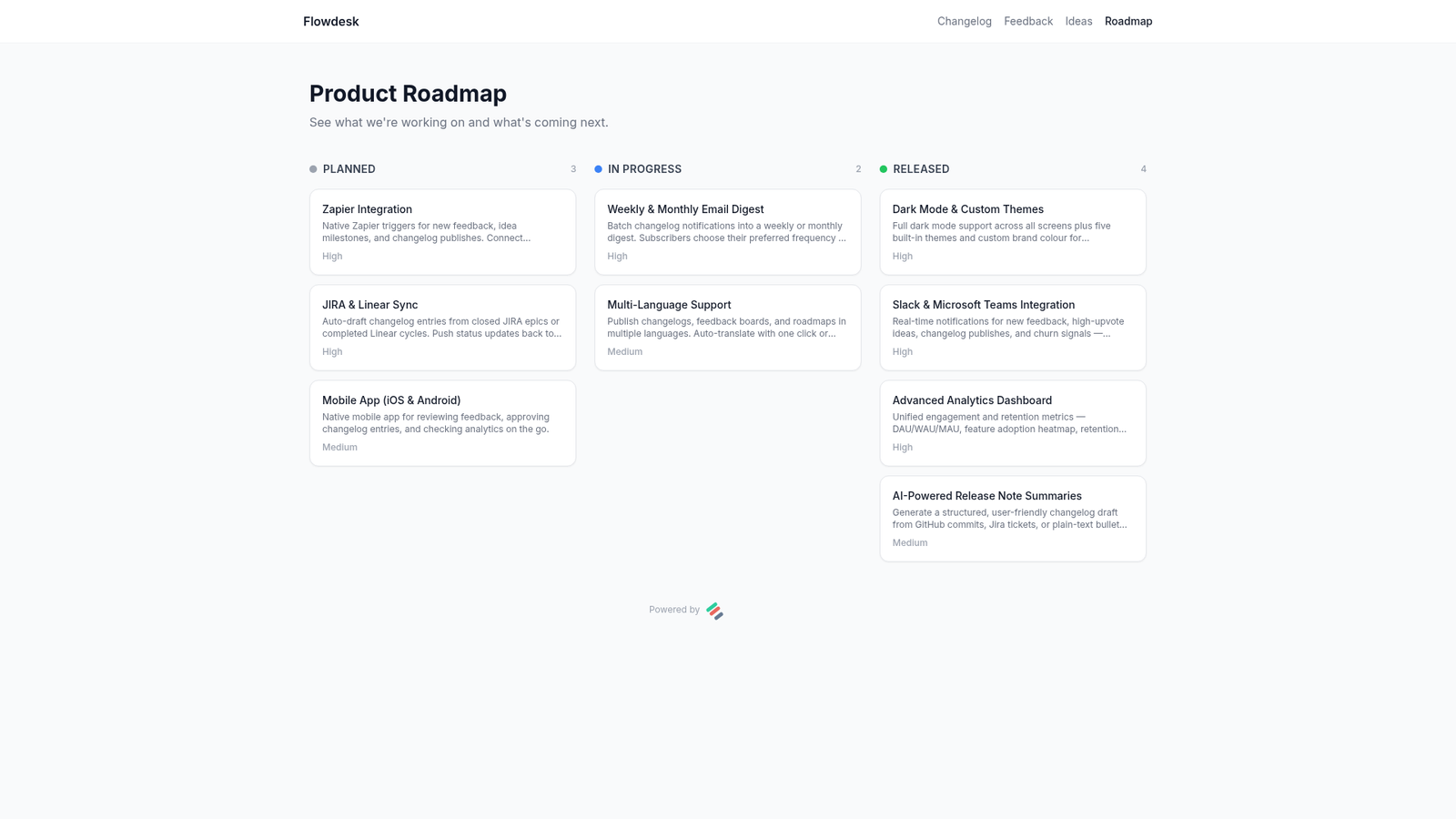
The most readable public roadmap format is a simple three-column Kanban board:
- Planned — items committed to but not yet started. Users know these are coming.
- In Progress — actively being built. Creates excitement and shows momentum.
- Released — shipped. Links back to the changelog entry. Proof you deliver.
The "Released" column is the most important one. A roadmap that never moves items to Released looks like vaporware. A roadmap that steadily ships items builds compounding trust with every update.
Putting specific dates on roadmap items. Dates create expectations that are painful to miss. Use quarters ("Q3 2026") at most, and only when you're genuinely confident. Most items should have no date at all — "Planned" is enough.
What to Put on Your Public Roadmap
Your public roadmap should show the what — not the how. Users care that you're building Slack integration; they don't need to know it requires refactoring the webhook system first. Write roadmap items in user-facing language, the same way you'd write a changelog entry.
Good items to include:
- Features with broad demand (highly upvoted on your feedback board)
- Integrations with popular tools in your category
- Performance improvements that affect large segments of your user base
- Mobile apps, APIs, or new platforms users have been requesting
What to Leave Off Your Public Roadmap
- Internal infrastructure work. Database migrations, server upgrades — these matter to engineering, not users.
- Speculative features. If you're still debating whether to build it, don't put it on the roadmap. Removing an item after a customer has quoted it in a sales call is painful.
- Competitive intelligence. If publishing an item would help a competitor, keep it internal.
- Bugs and hotfixes. These belong in the changelog after they're fixed, not on the roadmap before.
Connecting Your Roadmap to Your Feedback Board
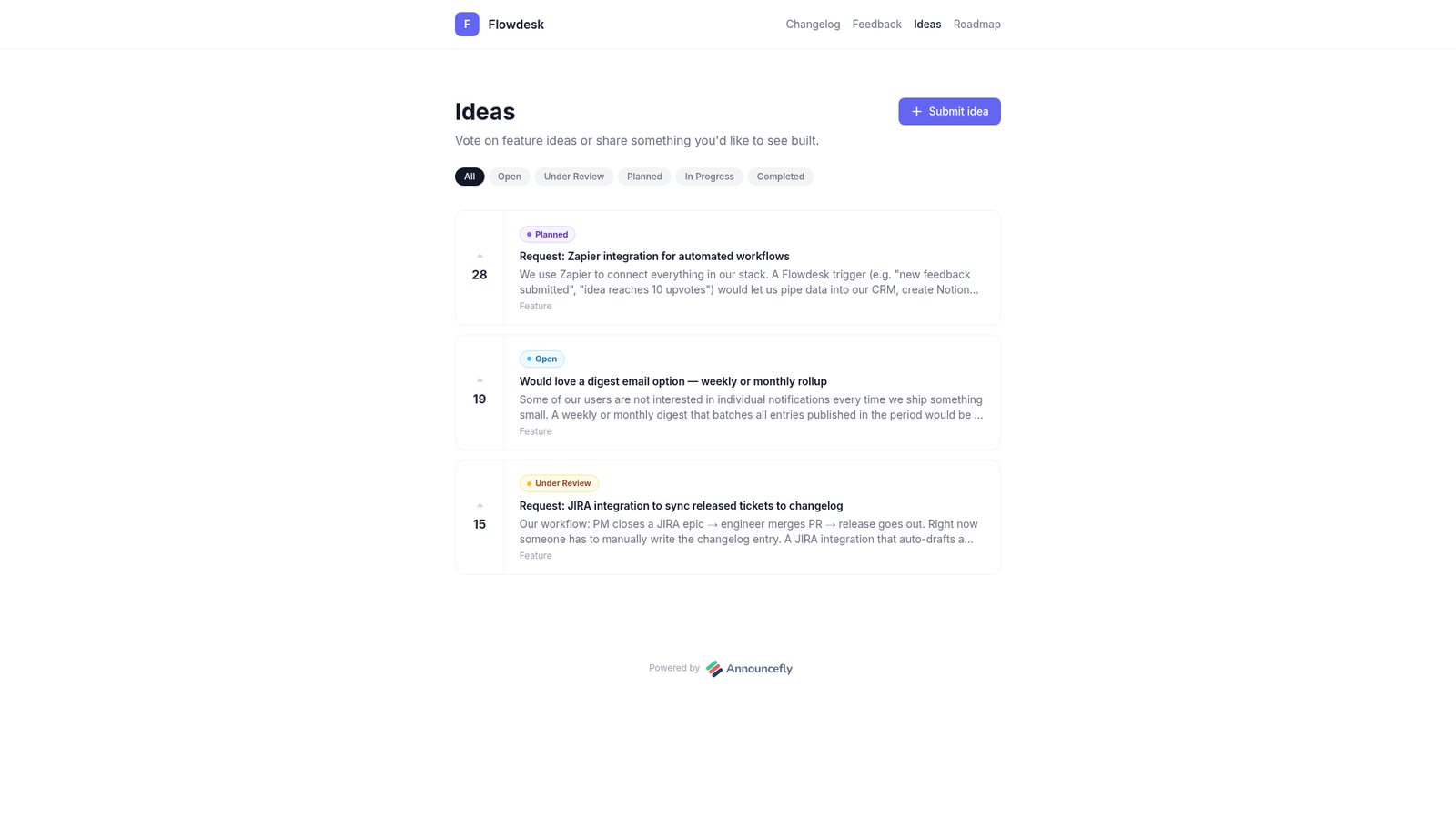
The most powerful version of a public roadmap is one that grows directly from user input. Here's the flow:
- Users submit ideas on your feedback board.
- Ideas accumulate upvotes and comments.
- High-upvote items graduate to the roadmap as "Planned."
- When work begins, they move to "In Progress."
- When shipped, they move to "Released" and a changelog entry is published.
- Email subscribers are notified automatically.
This loop — from feedback to roadmap to changelog to inbox — is the full product communication cycle. Every step closes a gap between what users want and what they know about.
How to Launch Your First Public Roadmap
- Audit your backlog. Pull out the 10–15 items that have broad user demand or are already in progress.
- Write user-facing titles. "Slack integration" not "Webhook refactor for third-party messaging."
- Assign columns honestly. Don't put 20 things in "Planned" if you're shipping 4 this quarter. Honesty builds more trust than optimism.
- Announce it. Email your subscribers, add a link in your in-app nav, and post on social. Users who don't know the roadmap exists can't benefit from it.
- Update it regularly. Move items forward when they start. Move them to Released when they ship. A stale roadmap is worse than no roadmap.
Measuring Roadmap Success
- Page visits. How many users visit the roadmap page each month?
- Feedback board activity. Does publishing a new roadmap item drive more upvotes on related ideas?
- Churn mentions. Do fewer churned users cite "missing features" when you have a roadmap showing those features coming?
- Sales assist rate. How often does your sales team cite the roadmap in deal conversations to close or prevent objections?
Key Takeaways
- A public roadmap reduces churn by turning uncertainty into confidence.
- Use a three-column Kanban (Planned / In Progress / Released) for maximum clarity.
- Write in user language, avoid specific dates, and leave internal work off the public view.
- Feed the roadmap from your feedback board — upvotes are your prioritisation engine.
- Update it consistently. A roadmap that ships regularly builds compounding trust.
Launch your public roadmap in under 5 minutes
AnnounceFly gives you a roadmap, feedback board, changelog, and email notifications — all connected. No setup headaches.
Start your free trial →Frequently Asked Questions
Include features you are committed to shipping, organized into three columns: Planned, In Progress, and Released. Avoid anything speculative or dependent on external factors. Focus on user-facing improvements rather than infrastructure work. Items in the Planned column should be real commitments, not a wish list — users will hold you to them.
Only if mismanaged. The main risks are: competitors copying ideas, users anchoring too hard on timelines, or your team feeling over-committed. Mitigate these by being vague on dates (use quarters, not specific dates), leaving flexibility in priorities, and only showing items you are genuinely planning to build within the foreseeable future.
Assign one person as the roadmap owner and add a recurring task to review it every sprint or month. When an item ships, move it to Released and publish a changelog entry explaining what you built. AnnounceFly links your roadmap items and changelog entries so this is a single action — your roadmap and changelog stay in sync automatically.
Usually not. Specific dates create expectation debt when timelines slip — and they always slip. Instead, use relative timeframes like "Next 30 days", "This Quarter", or "H2 2026". This gives users a clear sense of priority without boxing your team in. If you must show dates, add a buffer and communicate that estimates may shift.
A backlog is an internal prioritized list of everything you might build — it is for your team. A public roadmap is a curated, user-facing view of what you have committed to. Think of the roadmap as marketing and the backlog as operations. Never expose your full backlog publicly — it will confuse users and reveal too much about your strategy.
The changelog software your users will actually read
Start your free 7-day trial — no credit card required.
Start Free Trial →